NetDriver Agent 5 Minute Quickstart: Making Network Automation as Simple as Calling an API
Launching Netdriver with Docker to Automate your Network is a simple process.No need for SSH connection code or to write complex exceptions, NetDriver will make it as simple as calling a Rest API.
Why Use NetDriver?
If you've ever used Netmiko or directly used Paramiko to manage network devices, you've probably encountered these pain points:
- Establishing SSH connections for every operation (slow and resource-intensive)
- Concurrent operations easily lead to device configuration conflicts
- Need to handle SSH details in application code
- Lack of unified API interface, difficult to integrate into modern automation platforms
NetDriver solves these problems:
- ✅ HTTP RESTful API: Manage network devices like calling regular Web APIs
- ✅ Session persistence: Reuse SSH connections to improve performance
- ✅ Command queue: Automatic queuing to avoid concurrent conflicts
- ✅ AsyncSSH architecture: Support for high concurrency scenarios
- ✅ 20+ device model support: Cisco, Huawei, Juniper, Fortinet, Palo Alto...
Environment Preparation
Runtime Environment
- MacOS or Linux host;
- Docker: We recommend using
Dockerto runNetDriver Agentwhen experiencingNetDriverfor the first time, so please ensure Docker is installed on your system;
Network Devices
Network devices can be either physical or virtual. Virtual network devices are built using network simulators like PNETlab, GNS3, or EVE-NG.
In this demonstration, I will use two firewalls built with PNETLab as demonstration devices, with the following information:
| Device Model | Management IP | Username/Password |
|---|---|---|
| Paloalto PA | 192.168.60.99 | admin/admin |
| Juniper SRX | 192.168.60.68 | admin/r00tme |
Please ensure your test network devices have been initialized and have SSH service enabled with SSH access permissions granted to the relevant accounts.
Verify Network Devices Can Be Accessed via SSH
Verify SSH login to Paloalto
λ › ssh admin@192.168.60.99
Warning: Permanently added '192.168.60.99' (RSA) to the list of known hosts.
(admin@192.168.60.99) Password:
Last login: Mon Jan 12 11:33:37 2026 from 192.168.30.81

Number of failed attempts since last successful login: 0


Warning: Your device is still configured with the default admin account credentials. Please change your password prior to deployment.
admin@pa-60.99>
Verify SSH login to Juniper SRX
λ › ssh admin@192.168.60.68
Warning: Permanently added '192.168.60.68' (ED25519) to the list of known hosts.
(admin@192.168.60.68) Password:
--- JUNOS 12.1X47-D20.7 built 2015-03-03 21:53:50 UTC
admin@juniper-srx>
🚀 5-Minute Quickstart
Step 1: Launch NetDriver Agent (1 minute)
Follow these steps to run the instance
# Navigate to an empty directory for this tutorial, create config and logs directories
mkdir -p config/agent logs

# Download configuration file
curl -o config/agent/agent.yml https://raw.githubusercontent.com/OpenSecFlow/netdriver/master/config/agent/agent.yml

# View directory structure
tree
.
├── config
│   └── agent
│       └── agent.yml
└── logs

# Create instance using docker
docker run -d \
  --name netdriver-agent \
  -p 8000:8000 \
  -v $(pwd)/config:/app/config \
  -v $(pwd)/logs:/app/logs \
  ghcr.io/opensecflow/netdriver/netdriver-agent:latest
Verify successful startup:
# Check container status
docker ps
CONTAINER ID   IMAGE   COMMAND   CREATED   STATUS   PORTS   NAMES
1ae532da03a0   ghcr.io/opensecflow/netdriver/netdriver-agent:latest   "uvicorn netdriver.a…"   3 seconds ago   Up 2 seconds (health: starting)   0.0.0.0:8000->8000/tcp, [::]:8000->8000/tcp   netdriver-agent

# Call API
curl http://localhost:8000/health
{"status":"healthy","service":"netdriver-agent"}%
Check logs
λ › head -n 100 logs/agent.log
2026-01-12 15:35:08.922 +00:00 | INFO | - | uvicorn.server:_serve:82 | Started server process [1]
2026-01-12 15:35:08.922 +00:00 | INFO | - | uvicorn.lifespan.on:startup:48 | Waiting for application startup.
2026-01-12 15:35:08.922 +00:00 | INFO | - | netdriver.agent.main:on_startup:35 | Post-startup of NetDriver Agent
2026-01-12 15:35:08.922 +00:00 | INFO | - | netdriver.plugin.engine:__new__:24 | Creating PluginEngine instance
2026-01-12 15:35:08.922 +00:00 | INFO | - | netdriver.plugin.engine:_load_plugins:30 | Loading plugins...
2026-01-12 15:35:08.923 +00:00 | INFO | - | netdriver.plugin.core:__init__:25 | registed plugin: maipu/base -> <class 'netdriver.plugins.maipu.maipu.MaiPuBase'>
2026-01-12 15:35:08.923 +00:00 | INFO | - | netdriver.plugin.core:__init__:25 | registed plugin: maipu/nss.* -> <class 'netdriver.plugins.maipu.maipu_nss.MaiPuNSS'>
2026-01-12 15:35:08.924 +00:00 | INFO | - | netdriver.plugin.core:__init__:25 | registed plugin: fortinet/base -> <class 'netdriver.plugins.fortinet.fortinet.FortinetBase'>
2026-01-12 15:35:08.924 +00:00 | INFO | - | netdriver.plugin.core:__init__:25 | registed plugin: fortinet/fortigate.* -> <class 'netdriver.plugins.fortinet.fortinet_fortigate.FortinetFortiGate'>
2026-01-12 15:35:08.924 +00:00 | INFO | - | netdriver.plugin.core:__init__:25 | registed plugin: dptech/base -> <class 'netdriver.plugins.dptech.dptech.DptechBase'>
2026-01-12 15:35:08.924 +00:00 | INFO | - | netdriver.plugin.core:__init__:25 | registed plugin: dptech/fw.* -> <class 'netdriver.plugins.dptech.dptech_fw.DptechFWPath'>
2026-01-12 15:35:08.925 +00:00 | INFO | - | netdriver.plugin.core:__init__:25 | registed plugin: juniper/base -> <class 'netdriver.plugins.juniper.juniper.JuniperBase'>
2026-01-12 15:35:08.925 +00:00 | INFO | - | netdriver.plugin.core:__init__:25 | registed plugin: juniper/qfx.* -> <class 'netdriver.plugins.juniper.juniper_qfx.JuniperQFX'>
2026-01-12 15:35:08.925 +00:00 | INFO | - | netdriver.plugin.core:__init__:25 | registed plugin: juniper/ex.* -> <class 'netdriver.plugins.juniper.juniper_ex.JuniperEX'>
2026-01-12 15:35:08.925 +00:00 | INFO | - | netdriver.plugin.core:__init__:25 | registed plugin: juniper/srx.* -> <class 'netdriver.plugins.juniper.jnuiper_srx.JuniperSRX'>
2026-01-12 15:35:08.925 +00:00 | INFO | - | netdriver.plugin.core:__init__:25 | registed plugin: juniper/mx.* -> <class 'netdriver.plugins.juniper.juniper_mx.JuniperMX'>
2026-01-12 15:35:08.926 +00:00 | INFO | - | netdriver.plugin.core:__init__:25 | registed plugin: qianxin/base -> <class 'netdriver.plugins.qianxin.qianxin.QiAnXinBase'>
2026-01-12 15:35:08.926 +00:00 | INFO | - | netdriver.plugin.core:__init__:25 | registed plugin: qianxin/nsg.* -> <class 'netdriver.plugins.qianxin.qianxin_nsg.QiAnXinNSG'>
2026-01-12 15:35:08.926 +00:00 | INFO | - | netdriver.plugin.core:__init__:25 | registed plugin: paloalto/base -> <class 'netdriver.plugins.paloalto.paloalto.PaloaltoBase'>
2026-01-12 15:35:08.926 +00:00 | INFO | - | netdriver.plugin.core:__init__:25 | registed plugin: paloalto/pa.* -> <class 'netdriver.plugins.paloalto.paloalto_pa.PaloaltoPa'>
2026-01-12 15:35:08.927 +00:00 | INFO | - | netdriver.plugin.core:__init__:25 | registed plugin: hillstone/base -> <class 'netdriver.plugins.hillstone.hillstone.HillstoneBase'>
2026-01-12 15:35:08.927 +00:00 | INFO | - | netdriver.plugin.core:__init__:25 | registed plugin: hillstone/sg.* -> <class 'netdriver.plugins.hillstone.hillstone_sg.HillstoneSG'>
2026-01-12 15:35:08.927 +00:00 | INFO | - | netdriver.plugin.core:__init__:25 | registed plugin: check point/base -> <class 'netdriver.plugins.check_point.check_point.CheckPointBase'>
2026-01-12 15:35:08.927 +00:00 | INFO | - | netdriver.plugin.core:__init__:25 | registed plugin: check point/security gateway -> <class 'netdriver.plugins.check_point.check_point_security_gateway.CheckPointSecurityGateway'>
2026-01-12 15:35:08.927 +00:00 | INFO | - | netdriver.plugin.core:__init__:25 | registed plugin: h3c/base -> <class 'netdriver.plugins.h3c.h3c.H3CBase'>
2026-01-12 15:35:08.927 +00:00 | INFO | - | netdriver.plugin.core:__init__:25 | registed plugin: h3c/vsr.* -> <class 'netdriver.plugins.h3c.h3c_vsr.H3CVSR'>
2026-01-12 15:35:08.927 +00:00 | INFO | - | netdriver.plugin.core:__init__:25 | registed plugin: h3c/secpath -> <class 'netdriver.plugins.h3c.h3c_secpath.H3CSecPath'>
2026-01-12 15:35:08.927 +00:00 | INFO | - | netdriver.plugin.core:__init__:25 | registed plugin: arista/base -> <class 'netdriver.plugins.arista.arista.AristaBase'>
2026-01-12 15:35:08.928 +00:00 | INFO | - | netdriver.plugin.core:__init__:25 | registed plugin: arista/eos.* -> <class 'netdriver.plugins.arista.arista_eos.AristaEOS'>
2026-01-12 15:35:08.928 +00:00 | INFO | - | netdriver.plugin.core:__init__:25 | registed plugin: leadsec/base -> <class 'netdriver.plugins.leadsec.LeadsecBase'>
2026-01-12 15:35:08.928 +00:00 | INFO | - | netdriver.plugin.core:__init__:25 | registed plugin: leadsec/powerv -> <class 'netdriver.plugins.leadsec.leadsec_powerv.LeadsecPowerV'>
2026-01-12 15:35:08.928 +00:00 | INFO | - | netdriver.plugin.core:__init__:25 | registed plugin: cisco/base -> <class 'netdriver.plugins.cisco.cisco.CiscoBase'>
2026-01-12 15:35:08.928 +00:00 | INFO | - | netdriver.plugin.core:__init__:25 | registed plugin: cisco/asr.* -> <class 'netdriver.plugins.cisco.cisco_asr.CiscoASR'>
2026-01-12 15:35:08.928 +00:00 | INFO | - | netdriver.plugin.core:__init__:25 | registed plugin: cisco/isr.* -> <class 'netdriver.plugins.cisco.cisco_isr.CiscoISR'>
2026-01-12 15:35:08.928 +00:00 | INFO | - | netdriver.plugin.core:__init__:25 | registed plugin: cisco/asa -> <class 'netdriver.plugins.cisco.cisco_asa.CiscoASA'>
2026-01-12 15:35:08.928 +00:00 | INFO | - | netdriver.plugin.core:__init__:25 | registed plugin: cisco/nexus -> <class 'netdriver.plugins.cisco.cisco_nexus.CiscoNexus'>
2026-01-12 15:35:08.928 +00:00 | INFO | - | netdriver.plugin.core:__init__:25 | registed plugin: cisco/catalyst -> <class 'netdriver.plugins.cisco.cisco_catalyst.CiscoCatalyst'>
2026-01-12 15:35:08.928 +00:00 | INFO | - | netdriver.plugin.core:__init__:25 | registed plugin: huawei/base -> <class 'netdriver.plugins.huawei.huawei.HuaweiBase'>
2026-01-12 15:35:08.928 +00:00 | INFO | - | netdriver.plugin.core:__init__:25 | registed plugin: huawei/usg.* -> <class 'netdriver.plugins.huawei.huawei_usg.HuaweiUSG'>
2026-01-12 15:35:08.929 +00:00 | INFO | - | netdriver.plugin.core:__init__:25 | registed plugin: huawei/ce.* -> <class 'netdriver.plugins.huawei.huawei_ce.HuaweiCE'>
2026-01-12 15:35:08.929 +00:00 | INFO | - | netdriver.plugin.core:__init__:25 | registed plugin: topsec/base -> <class 'netdriver.plugins.topsec.topsec.TopSecBase'>
2026-01-12 15:35:08.929 +00:00 | INFO | - | netdriver.plugin.core:__init__:25 | registed plugin: topsec/ngfw.* -> <class 'netdriver.plugins.topsec.topsec_ngfw.TopSecNGFW'>
2026-01-12 15:35:08.929 +00:00 | INFO | - | netdriver.plugin.core:__init__:25 | registed plugin: array/base -> <class 'netdriver.plugins.array.array.ArrayBase'>
2026-01-12 15:35:08.929 +00:00 | INFO | - | netdriver.plugin.core:__init__:25 | registed plugin: array/ag -> <class 'netdriver.plugins.array.array_ag.ArrayAG'>
2026-01-12 15:35:08.929 +00:00 | INFO | - | netdriver.plugin.core:__init__:25 | registed plugin: chaitin/base -> <class 'netdriver.plugins.chaitin.chaitin.ChaiTinBase'>
2026-01-12 15:35:08.929 +00:00 | INFO | - | netdriver.plugin.core:__init__:25 | registed plugin: chaitin/ctdsg.* -> <class 'netdriver.plugins.chaitin.chaitin_ctdsg.ChaiTinCTDSG'>
2026-01-12 15:35:08.929 +00:00 | INFO | - | netdriver.plugin.core:__init__:25 | registed plugin: venustech/base -> <class 'netdriver.plugins.venustech.venustech.VenustechBase'>
2026-01-12 15:35:08.929 +00:00 | INFO | - | netdriver.plugin.core:__init__:25 | registed plugin: venustech/usg.* -> <class 'netdriver.plugins.venustech.venustech_usg.VenustechUSG'>
2026-01-12 15:35:08.929 +00:00 | INFO | - | netdriver.plugin.engine:_load_plugins:45 | Loaded 43 plugins.
2026-01-12 15:35:08.929 +00:00 | INFO | - | netdriver.client.pool:__new__:28 | Creating SessionManager instance
2026-01-12 15:35:08.930 +00:00 | INFO | - | uvicorn.lifespan.on:startup:62 | Application startup complete.
2026-01-12 15:35:08.930 +00:00 | INFO | - | uvicorn.server:_log_started_message:214 | Uvicorn running on http://0.0.0.0:8000 (Press CTRL+C to quit)
2026-01-12 15:35:13.779 +00:00 | INFO | a50b6b8f733049dfa02553ec93a39a9d | uvicorn.protocols.http.h11_impl:send:473 | 127.0.0.1:40212 - "GET /health HTTP/1.1" 200
You can see the following key information from the logs:
Application startup completeindicates successful startup;- During startup, NetDriver has loaded 43 plugins;
🎉 Congratulations! NetDriver Agent is now running!
Additionally, we provide OpenAPI documentation and debugging interface based on the FastAPI framework, which you can access at: http://localhost:8000/docs
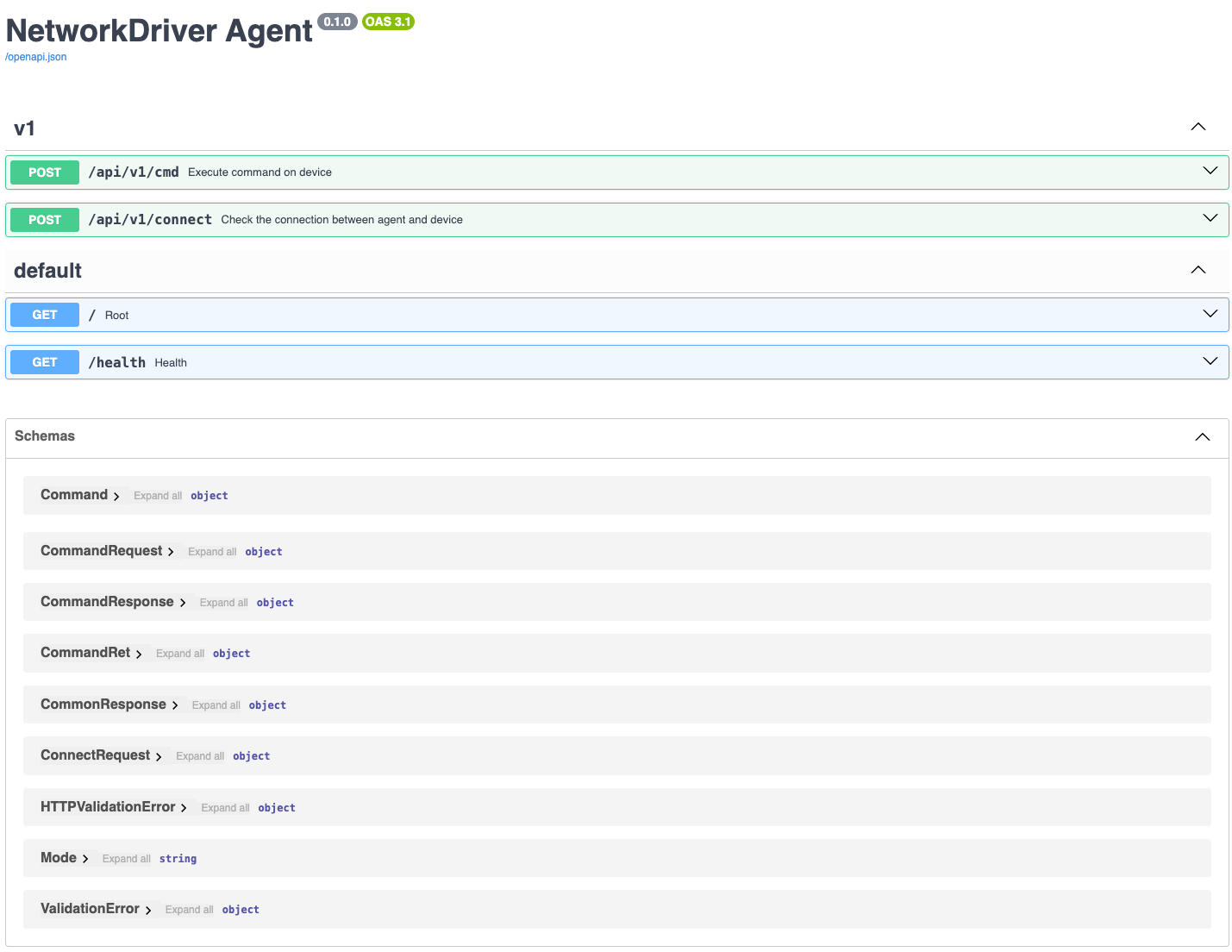
Step 2: Test Device Connection (1 minute)
Before starting configuration, let's test if we can connect to your network device.
Send Connection Test Request - Paloalto
λ › curl -X 'POST' 'http://localhost:8000/api/v1/connect' \
  -H 'accept: application/json' \
  -H 'Content-Type: application/json' \
  -d '{
  "protocol": "ssh",
  "ip": "192.168.60.99",
  "port": 22,
  "username": "admin",
  "password": "admin",
  "enable_password": "",
  "vendor": "paloalto",
  "model": "pa",
  "version": "*",
  "encode": "utf-8",
  "timeout": 10
}'
{"code":"OK","msg":"Connection is alive"}%
λ ›
🔍 Connection Test Request Explanation
This request tests NetDriver's SSH connection to the target device. Let's analyze each parameter in detail:
| Parameter | Example | Description |
|---|---|---|
| protocol | ssh | Connection protocol, currently only SSH is supported |
| ip | 192.168.60.99 | Device management IP address |
| port | 22 | SSH port |
| username | admin | Login username |
| password | admin | Login password |
| enable_password | - | Enable password (optional). Devices like Cisco and Array require an enable password when entering enable mode. PA doesn't require an enable password, so it can be left empty. |
| vendor | paloalto, juniper, cisco, etc. | Device vendor, can check supported vendors through OpenAPI |
| model | pa, srx, ios, etc. | Device model, can check supported models through OpenAPI |
| version | *, 9.6, etc. | Device version. NetDriver Agent loads the corresponding Plugin based on the version number. Currently, each vendor and model has only one Plugin, so '*' can be used as version information; if multiple version Plugins exist for the same model in the future, you'll need to specify the version to load the correct plugin |
| encode | utf-8, gbk, etc. | Character encoding, defaults to utf-8; for some Chinese vendor devices, GBK encoding can be used; after specifying character encoding, NetDriver Agent will convert collected output from the specified encoding to utf-8, and convert commands sent to the device from utf-8 back to the specified encoding, thus solving garbled character issues |
| timeout | 10 | Connection timeout (seconds) |
🔍 Response Explanation
"code":"OK": Connection successful; if connection fails, a specific error code will be returned;"msg":"Connection is alive": Specific information returned on successful connection; if connection fails, specific error information will be returned;
Send Connection Test Request - Juniper SRX
λ › curl -X 'POST' 'http://localhost:8000/api/v1/connect' \
  -H 'accept: application/json' \
  -H 'Content-Type: application/json' \
  -d '{
  "protocol": "ssh",
  "ip": "192.168.60.68",
  "port": 22,
  "username": "admin",
  "password": "r00tme",
  "enable_password": "",
  "vendor": "juniper",
  "model": "srx",
  "version": "*",
  "encode": "utf-8",
  "timeout": 10
}'
{"code":"OK","msg":"Connection is alive"}%
λ ›
Step 3: Execute Your First Command (2 minutes)
First, we'll execute the show system info command on the Paloalto PA device and parse the output using a Textfsm template to get the device's version number and hostname;
Then, we'll execute multiple requests on the Juniper SRX device to demonstrate NetDriver Agent's ability to automatically switch execution modes;
Paloalto PA: Execute show system info
Send Command Execution Request:
curl -X 'POST' \
  'http://localhost:8000/api/v1/cmd' \
  -H 'accept: application/json' \
  -H 'Content-Type: application/json' \
  -d '{
  "protocol": "ssh",
  "ip": "192.168.60.99",
  "port": 22,
  "username": "admin",
  "password": "admin",
  "enable_password": "",
  "vendor": "paloalto",
  "model": "pa",
  "version": "*",
  "encode": "utf-8",
  "vsys": "default",
  "timeout": 60,
  "continue_on_error": true,
  "commands": [
    {
      "type": "raw",
      "mode": "enable",
      "command": "show system info",
      "detail_output": true
    }
  ]
}'
Unlike the connection test interface /api/v1/connect, the command execution interface /api/v1/cmd adds three parameters: vsys, continue_on_error, and commands.
vsys: Used to specify the virtual system for this command execution; many network devices support logical virtualization, turning one physical device into multiple logical devices with their own independent network interfaces, routing tables, and CLI execution contexts. Examples include Juniper's Logical System, Paloalto/Huawei/Hillstone's vsys, and Fortinet Fortigate's VDOM. By specifying vsys, NetDriver Agent automatically recognizes the current session's vsys and automatically switches to the specified vsys, simplifying command execution;commands: Support executing multiple commands in one requesttype: Command output typeraw: Plain text, output content is not parsed;textfsm: Parse output content using Textfsm template engine;
mode: Command execution mode, specifies the command execution mode, NetDriver Agent automatically recognizes the current session's mode and automatically switches to the mode specified in the request;login: Login mode;enable: Privileged mode;config: Configuration mode;
command: Commanddetail_output: Whether to output detailed execution recordstrue: Output detailed execution records, including vsys and mode switching processes, etc.;false: Ignore vsys and mode switching process records, only keep command execution echo;
Response Example:
{
  "code": "OK",
  "msg": "",
  "time": 0.31156492233276367,
  "result": [
    {
      "ret_code": "OK",
      "command": "show system info",
      "ret": "\u001b[Kadmin@pa-60.99> show system info\n\nhostname: pa-60.99\nip-address: 192.168.60.99\npublic-ip-address: unknown\nnetmask: 255.255.255.0\ndefault-gateway: 192.168.60.1\nip-assignment: static\nipv6-address: unknown\nipv6-link-local-address: fe80::524d:13ff:fe00:600/64\nipv6-default-gateway: \nmac-address: 50:4d:13:00:06:00\ntime: Tue Jan 13 01:16:13 2026\nuptime: 1 days, 17:38:49\nfamily: vm\nmodel: PA-VM\nserial: unknown\nvm-mac-base: BA:DB:EE:FB:AD:00\nvm-mac-count: 255\nvm-uuid: 6A28E9C6-1288-4A90-89E1-FC1766012B98\nvm-cpuid: KVM:63060000FDFB8B07\nvm-license: none\nvm-mode: KVM\ncloud-mode: non-cloud\nsw-version: 8.1.0\nglobal-protect-client-package-version: 0.0.0\napp-version: 769-4439\napp-release-date: \nav-version: 0\nav-release-date: \nthreat-version: 0\nthreat-release-date: \nwf-private-version: 0\nwf-private-release-date: unknown\nurl-db: paloaltonetworks\nwildfire-version: 0\nwildfire-release-date: \nurl-filtering-version: 0000.00.00.000\nglobal-protect-datafile-version: unknown\nglobal-protect-datafile-release-date: unknown\nglobal-protect-clientless-vpn-version: 0\nglobal-protect-clientless-vpn-release-date: \nlogdb-version: 8.1.8\nplatform-family: vm\nvpn-disable-mode: off\nmulti-vsys: off\noperational-mode: normal\n\nadmin@pa-60.99> "
    }
  ],
  "output": "\u001b[Kadmin@pa-60.99> show system info\n\nhostname: pa-60.99\nip-address: 192.168.60.99\npublic-ip-address: unknown\nnetmask: 255.255.255.0\ndefault-gateway: 192.168.60.1\nip-assignment: static\nipv6-address: unknown\nipv6-link-local-address: fe80::524d:13ff:fe00:600/64\nipv6-default-gateway: \nmac-address: 50:4d:13:00:06:00\ntime: Tue Jan 13 01:16:13 2026\nuptime: 1 days, 17:38:49\nfamily: vm\nmodel: PA-VM\nserial: unknown\nvm-mac-base: BA:DB:EE:FB:AD:00\nvm-mac-count: 255\nvm-uuid: 6A28E9C6-1288-4A90-89E1-FC1766012B98\nvm-cpuid: KVM:63060000FDFB8B07\nvm-license: none\nvm-mode: KVM\ncloud-mode: non-cloud\nsw-version: 8.1.0\nglobal-protect-client-package-version: 0.0.0\napp-version: 769-4439\napp-release-date: \nav-version: 0\nav-release-date: \nthreat-version: 0\nthreat-release-date: \nwf-private-version: 0\nwf-private-release-date: unknown\nurl-db: paloaltonetworks\nwildfire-version: 0\nwildfire-release-date: \nurl-filtering-version: 0000.00.00.000\nglobal-protect-datafile-version: unknown\nglobal-protect-datafile-release-date: unknown\nglobal-protect-clientless-vpn-version: 0\nglobal-protect-clientless-vpn-release-date: \nlogdb-version: 8.1.8\nplatform-family: vm\nvpn-disable-mode: off\nmulti-vsys: off\noperational-mode: normal\n\nadmin@pa-60.99> \n===== end exec cmd: [show system info] 2026-01-12 17:16:15.702532 =====\n"
}
time: Request execution time in seconds;output: Execution record of the entire request, including execution records of all commands;result: Execution result of each commandret_code: Execution return code for a single command,OKindicates successful execution, if failed, an error code will be displayed;command: Executed command;ret: Return content, if it's arawtype command, returns CLI echo; if it's atextfsmtype command, returns parsed content;
We can see that the request was successfully executed and returned content. You can format and print the output using Python or other languages for a more intuitive output.
admin@pa-60.99> show system info

hostname: pa-60.99
ip-address: 192.168.60.99
public-ip-address: unknown
netmask: 255.255.255.0
default-gateway: 192.168.60.1
ip-assignment: static
ipv6-address: unknown
ipv6-link-local-address: fe80::524d:13ff:fe00:600/64
ipv6-default-gateway:
mac-address: 50:4d:13:00:06:00
time: Tue Jan 13 01:16:13 2026
uptime: 1 days, 17:38:49
family: vm
model: PA-VM
serial: unknown
vm-mac-base: BA:DB:EE:FB:AD:00
vm-mac-count: 255
vm-uuid: 6A28E9C6-1288-4A90-89E1-FC1766012B98
vm-cpuid: KVM:63060000FDFB8B07
vm-license: none
vm-mode: KVM
cloud-mode: non-cloud
sw-version: 8.1.0
global-protect-client-package-version: 0.0.0
app-version: 769-4439
app-release-date:
av-version: 0
av-release-date:
threat-version: 0
threat-release-date:
wf-private-version: 0
wf-private-release-date: unknown
url-db: paloaltonetworks
wildfire-version: 0
wildfire-release-date:
url-filtering-version: 0000.00.00.000
global-protect-datafile-version: unknown
global-protect-datafile-release-date: unknown
global-protect-clientless-vpn-version: 0
global-protect-clientless-vpn-release-date:
logdb-version: 8.1.8
platform-family: vm
vpn-disable-mode: off
multi-vsys: off
operational-mode: normal

admin@pa-60.99>
===== end exec cmd: [show system info] 2026-01-12 17:16:15.702532 =====
🎊 Awesome! You've successfully executed network device commands via HTTP API!
Paloalto PA: Execute show system info and parse with textfsm
textfsm is an open-source text parsing library by Google that allows us to easily extract structured data from text information for status monitoring, configuration inspection, and retrieval.
NetDriver Agent has built-in support for textfsm with enhancements (to be introduced in future articles). In this step, I'll demonstrate how to use textfsm to get the PA firewall's hostname and version (sw-version).
First, here is the textfsm template for extracting text:
Value HOSTNAME (\S+)
Value VERSION (\S+)

Start
  ^hostname:\s+${HOSTNAME}
  ^sw-version:\s+${VERSION}
Send Command Execution Request:
curl -X 'POST' \
  'http://localhost:8000/api/v1/cmd' \
  -H 'accept: application/json' \
  -H 'Content-Type: application/json' \
  -d '{
  "protocol": "ssh",
  "ip": "192.168.60.99",
  "port": 22,
  "username": "admin",
  "password": "admin",
  "enable_password": "",
  "vendor": "paloalto",
  "model": "pa",
  "version": "*",
  "encode": "utf-8",
  "vsys": "default",
  "timeout": 60,
  "continue_on_error": true,
  "commands": [
    {
      "type": "textfsm",
      "mode": "enable",
      "command": "show system info",
      "template": "Value HOSTNAME (\\S+)\nValue VERSION (\\S+)\n\nStart\n  ^hostname:\\s+${HOSTNAME}\n  ^sw-version:\\s+${VERSION}\n",
      "detail_output": true
    }
  ]
}' | python -m json.tool
Response Example:
{
    "code": "OK",
    "msg": "",
    "time": 0.23800420761108398,
    "result": [
        {
            "ret_code": "OK",
            "command": "show system info",
            "ret": [
                {
                    "HOSTNAME": "pa-60.99",
                    "VERSION": "8.1.0"
                }
            ]
        }
    ],
    "output": "\u001b[Kadmin@pa-60.99> show system info\n\nhostname: pa-60.99\nip-address: 192.168.60.99\npublic-ip-address: unknown\nnetmask: 255.255.255.0\ndefault-gateway: 192.168.60.1\nip-assignment: static\nipv6-address: unknown\nipv6-link-local-address: fe80::524d:13ff:fe00:600/64\nipv6-default-gateway: \nmac-address: 50:4d:13:00:06:00\ntime: Tue Jan 13 02:15:17 2026\nuptime: 1 days, 18:37:54\nfamily: vm\nmodel: PA-VM\nserial: unknown\nvm-mac-base: BA:DB:EE:FB:AD:00\nvm-mac-count: 255\nvm-uuid: 6A28E9C6-1288-4A90-89E1-FC1766012B98\nvm-cpuid: KVM:63060000FDFB8B07\nvm-license: none\nvm-mode: KVM\ncloud-mode: non-cloud\nsw-version: 8.1.0\nglobal-protect-client-package-version: 0.0.0\napp-version: 769-4439\napp-release-date: \nav-version: 0\nav-release-date: \nthreat-version: 0\nthreat-release-date: \nwf-private-version: 0\nwf-private-release-date: unknown\nurl-db: paloaltonetworks\nwildfire-version: 0\nwildfire-release-date: \nurl-filtering-version: 0000.00.00.000\nglobal-protect-datafile-version: unknown\nglobal-protect-datafile-release-date: unknown\nglobal-protect-clientless-vpn-version: 0\nglobal-protect-clientless-vpn-release-date: \nlogdb-version: 8.1.8\nplatform-family: vm\nvpn-disable-mode: off\nmulti-vsys: off\noperational-mode: normal\n\nadmin@pa-60.99> \n===== end exec cmd: [show system info] 2026-01-12 18:15:20.423826 =====\n"
}
ret: Returns parsed results
Juniper SRX: Execute Commands in Multiple Different Modes
In our actual requirements, we usually need to execute commands in different modes to complete tasks. For example:
- Log in to CLI via SSH
- Enter configuration mode and execute commands to modify hostname
- Commit or save changes
Below we'll complete the above requirements through a single API call.
Request:
curl -X 'POST' \
  'http://localhost:8000/api/v1/cmd' \
  -H 'accept: application/json' \
  -H 'Content-Type: application/json' \
  -d '{
  "protocol": "ssh",
  "ip": "192.168.60.68",
  "port": 22,
  "username": "admin",
  "password": "r00tme",
  "enable_password": "",
  "vendor": "juniper",
  "model": "srx",
  "version": "*",
  "encode": "utf-8",
  "vsys": "default",
  "timeout": 60,
  "continue_on_error": true,
  "commands": [
    {
      "type": "raw",
      "mode": "config",
      "command": "set system host-name srx-68",
      "detail_output": true
    },
    {
      "type": "raw",
      "mode": "config",
      "command": "commit",
      "detail_output": true
    },
    {
      "type": "raw",
      "mode": "enable",
      "command": "show configuration system host-name",
      "detail_output": true
    }
  ]
}' | python -m json.tool
Response:
{
    "code": "OK",
    "msg": "",
    "time": 5.624331712722778,
    "result": [
        {
            "ret_code": "OK",
            "command": "set system host-name srx-68",
            "ret": "admin@srx-demo> configure private \nwarning: uncommitted changes will be discarded on exit\nEntering configuration mode\n\n[edit]\nadmin@srx-demo# set system host-name srx-68 \n\n[edit]\nadmin@srx-demo# "
        },
        {
            "ret_code": "OK",
            "command": "commit",
            "ret": "admin@srx-demo# commit \ncommit complete\n\n[edit]\nadmin@srx-68# "
        },
        {
            "ret_code": "OK",
            "command": "show configuration system host-name",
            "ret": "admin@srx-68# exit \nExiting configuration mode\n\nadmin@srx-68> show configuration system host-name \nhost-name srx-68;\n\nadmin@srx-68> "
        }
    ],
    "output": "\n===== start exec cmd: [set system host-name srx-68] 2026-01-12 18:41:17.984849 =====\nadmin@srx-demo> configure private \nwarning: uncommitted changes will be discarded on exit\nEntering configuration mode\n\n[edit]\nadmin@srx-demo# set system host-name srx-68 \n\n[edit]\nadmin@srx-demo# \n===== end exec cmd: [set system host-name srx-68] 2026-01-12 18:41:17.984866 =====\n\n===== start exec cmd: [commit] 2026-01-12 18:41:22.830342 =====\nadmin@srx-demo# commit \ncommit complete\n\n[edit]\nadmin@srx-68# \n===== end exec cmd: [commit] 2026-01-12 18:41:22.830356 =====\n\n===== start exec cmd: [show configuration system host-name] 2026-01-12 18:41:23.205045 =====\nadmin@srx-68# exit \nExiting configuration mode\n\nadmin@srx-68> show configuration system host-name \nhost-name srx-68;\n\nadmin@srx-68> \n===== end exec cmd: [show configuration system host-name] 2026-01-12 18:41:23.205069 =====\n"
}
We can view the output to see that NetDriver Agent completed automatic mode switching
===== start exec cmd: [set system host-name srx-68] 2026-01-12 18:41:17.984849 =====
admin@srx-demo> configure private
warning: uncommitted changes will be discarded on exit
Entering configuration mode

[edit]
admin@srx-demo# set system host-name srx-68

[edit]
admin@srx-demo#
===== end exec cmd: [set system host-name srx-68] 2026-01-12 18:41:17.984866 =====

===== start exec cmd: [commit] 2026-01-12 18:41:22.830342 =====
admin@srx-demo# commit
commit complete

[edit]
admin@srx-68#
===== end exec cmd: [commit] 2026-01-12 18:41:22.830356 =====

===== start exec cmd: [show configuration system host-name] 2026-01-12 18:41:23.205045 =====
admin@srx-68# exit
Exiting configuration mode

admin@srx-68> show configuration system host-name
host-name srx-68;

admin@srx-68>
===== end exec cmd: [show configuration system host-name] 2026-01-12 18:41:23.205069 =====
📝 Summary
Through this 5-minute quickstart tutorial, you've mastered the core usage of NetDriver:
✅ What You've Learned
- Environment Setup: Quickly launch NetDriver Agent using Docker
- Device Connection: Test SSH connections to network devices via RESTful API
- Command Execution:
- Execute basic commands and get raw output
- Use TextFSM templates to parse structured data
- Automatically switch between multiple execution modes (login/enable/config)
- Automation Capabilities: Experience the convenience of NetDriver's automatic SSH session and mode switching
💡 Practical Value
In just 5 minutes, you can now:
- Manage Palo Alto and Juniper devices via API
- Automate configuration changes and commits
- Extract key information from device output (hostname, version, etc.)
These capabilities can be directly applied to scenarios like configuration automation, status inspection, and configuration backup!
📚 Next Steps
Congratulations on completing the NetDriver quickstart! Here's what you can do next:
Explore More Features:
Community:
- 💬 Discord Community: Real-time Q&A and discussions
- ⭐ GitHub Star: Support project development
- 🐛 Submit Issues: Report bugs or suggest new features
Follow Updates:
Author: Vincent Bergman